
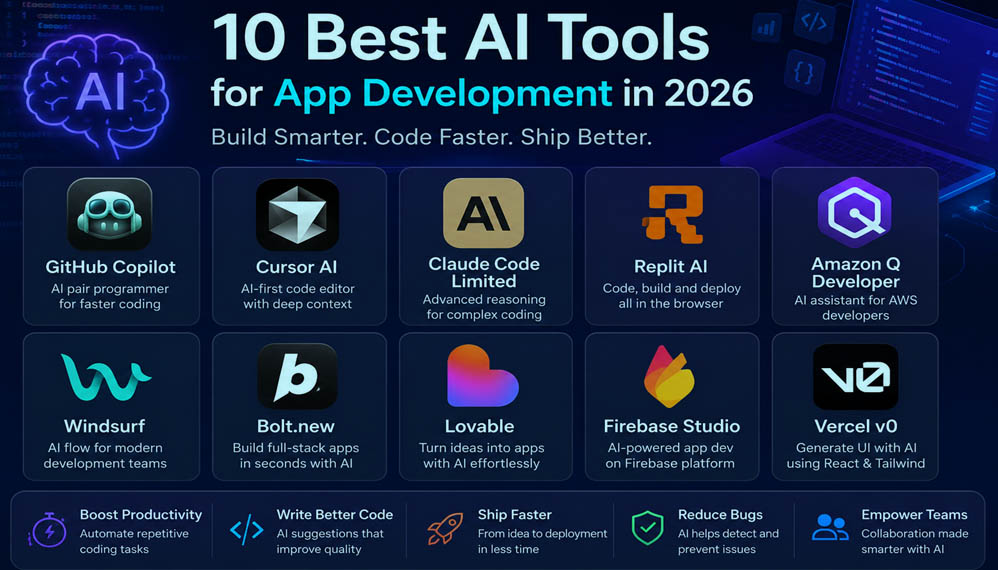
App Development in 2026
In recent years, the field of software development has witnessed radical transformation. Creating a great number of codes manually is no longer an exclusive way of developing sophisticated applications. AI comes in handy for developers now and helps them from code generation to debugging complicated applications.
Whether you are launching a startup, creating a simple personal project, or working on enterprise software development, AI tools help you reduce repetitive work. Today’s AI capabilities are more than mere code completion tools. Now, AI can help to understand unknown code, create API, optimize SQL queries, produce documentation, find security gaps, and even propose better software architecture. This guide will explore the most promising AI tools for application development that will be available in 2026 including their specifications, strengths, use cases, pricing models, and type of developers for whom they work best.
Why AI Is Transforming Modern App Development
Artificial intelligence is no longer a vision of the future as far as software development is concerned – it is today used in the daily operations of countless programmers. The discipline of software engineering usually requires a good deal of effort for repetitious activities such as programming tasks, testing, and debugging. By applying Aritifical Intelligence technologies one can eliminate many of these repetitive tasks so as to increase efficiency of programmers at work on improving the quality of programs.
Modern Artificial Intelligence technologies can help the development process through:
- • Code writing-
- • Designing tools for bug detection-
- • Providing explanations about code-
- • Creating unit tests automatically-
- • Refactoring-
- • Generating documentation-
- • API development-
- • Providing assistance in the process of translating from one programming language into another-
- • UI design-
- • Security improvement-
Thus, AI does not replace professionals but rather makes their work more productive.
What Makes an AI Development Tool Outstanding?
Not all AI tools are made equal. One might be better than others for coding, others for testing, documenting, or building UIs. If you are considering AI tools, bear these features in mind:
1. Code Accuracy
The generated code should follow industry best practices, compile, and require little to no correction. Reliable code suggestions save hours on debugging and speed up development.
2. Language Support
Good AI coding assistance supports multiple languages, such as:
- Python
- JavaScript
- TypeScript
- Java
- Kotlin
- Swift
- PHP
- C#
- Go
- Rust
- SQL
Using an AI tool for different projects becomes efficient if you don’t have to switch between tools for language-specific needs.
3. IDE Integration
The right AI companion must seamlessly integrate into popular development environments such as:
- Visual Studio Code
- JetBrains IDEs
- Android Studio
- Xcode
- Visual Studio
Seamless integration means that an AI assistant should not disrupt the development process in any way.
4. Documentation Generation
Documentation writing is frequently disregarded during software development due to time constraints. AI can create various forms of documentation, including:
- API documentation
- Function documentation
- READMEs
- Code comments
- Technical documentation
This ensures that documentation isn’t left behind and helps in long-term maintenance.
5. Security Assistance
Every application has a security aspect. Leading AI assistants help developers identify:
- SQL Injection risks
- Authentication flaws
- API security issues
- Hardcoded secrets
- Insecure library versions
Detecting potential threats early helps reduce production risks and improve app security.
Why developers love AI Coding Assistants
The biggest benefit isn’t the faster writing speed.
They save time on the little things developers waste time on otherwise.
Developers use these tools because they reduce the mental energy. Instead of constantly Googling syntax questions and digging through docs, developers have immediate help to suggest the code snippet they need. That used to take hours, now it takes minutes. Instead, developers focus on creativity, architecture, performance optimization and UI design.
Top 10 Best AI Tools for App Development
In this list of app development tools with AI, we evaluated each one based on the following criteria: Developer adoption rate
- • Features set
- • Productivity enhancements
- • Ecosystem support
- • Pricing
- • Real-world usability
We’re looking for a tool’s impact on actual software development, not just marketing claims.
1. GitHub Copilot
GitHub Copilot is still one of the most influential AI coding assistants available. It’s designed to integrate directly into most popular IDEs to help developers write code more quickly by suggesting functions, redundant code patterns, and boilerplate code in real time. It takes a few of the most tedious parts of coding and makes them disappear.
Unlike plain code autocomplete features, it’s able to understand context within a project so the suggestions are usually extremely relevant to the project you’re building.
| Best For—————- Professional developers Full-stack development Web apps Mobile apps Backend APIs Key Features Context-aware code suggestions Multi-language support Function generation Code explanation Documentation assistance Test generation Pros Excellent VS Code integration Large language support Saves development time by hours Learns from your project context Cons |
2. Cursor AI
Amongst AI-first coding editors, Cursor is one that developers are most likely to mention. While other products simply plug AI into a preexisting coding editor, Cursor was built entirely with artificial intelligence at the center. It understands your entire codebase (rather than a single file) so it’s able to explain code connections, create entirely new code modules, fix errors across multiple files, and refactor large chunks of code in just moments. For software engineers who have medium- or large-sized codebases, it’s an absolute time saver.
| Best For——————– Large software projects SaaS Development Full-stack applications Professional developers Startup engineering teams Key Features AI-powered code editing Multi-file code understanding Intelligent code refactoring Natural language coding instructions Instant bug fixing across files Codebase explanation Pros Great context awareness Fast performance Clean interface Good for complex codebases Cons Paid for some advanced features Has a learning curve for some developers |
3. Claude Code
Claude Code is one that’s becoming very popular amongst the community. While it’s capable of generating code like many of its contemporaries,Claude shines in its ability toreasonand explain code beyond the surface-level code generation.
This makes it a favorite amongst senior developers, asClaude can assist with analyzing large codebases for issues with the underlying architecture, make design recommendations, and generate high-quality documentation. It is viewed by many engineers as an AI code review assistant rather than just another autocomplete feature.
| Best For————————- Software architecture Code reviews Documentation Backend Development Learning programming concepts Key Features Long-context window Code explanation Documentation generation Bug analysis Refactoring suggestions Design recommendations Pros Strong reasoning skills Understands large projects Writes well-structured, readable code Generates excellent documentation Cons Slower than light weight auto complete tools Limited integration compared to others |
4. Replit AI
Replit already reinvented what was possible on a browser with a coding IDE. Replit AItakes this a step further. This tool can generate fully-fledged applications from a simple plain-language prompt and it will present you with the fully complete application in just minutes. It even features one-click deployment so you can be building with that code in the live web.
The tool is incredibly useful for beginners, students and founders testing new ideas rapidly.
| Best For—————— Beginners Students Rapid prototyping Hackathons MVP development Key Features In-browser coding IDE AI coding assistant One-click deployment Collaborative workspace Live app preview Pros No installation needed Extremely beginner-friendly Instant deployment to live web Fantastic collaboration features Cons Limited in customizability for complex enterprise use cases Performance depends on internet connection speed |
5. Amazon Q Developer
Amazon Q Developer is a specific AI tool for developers that focus primarily on working within the AWS ecosystem. Instead of purely on code, Q focuses on helps developers use their cloud environment and software deployment tools more efficiently. This includes help in managing cloud services, optimizing infrastructure, security reviews and more. If you are already building a cloud native application on AWS, Amazon Q will make you more efficient.
| Best For———————– AWS developers Cloud-native application development Enterprise software DevOps engineers Key Features AWS integration Cloud optimization Infrastructure as code (IaC) assistance Security checks and recommendations Documentation helper Pros Extensive knowledge of AWS Services In-depth security analysis Ready for enterprise deployment Powerful cloud optimization capabilities Cons Less effective outside the AWS ecosystem Initial learning curve for newcomers |
6. Windsurf
Windsurf is another promising option for AI coding assistance that is making waves with its speed and intelligent project understanding. It excels at maintaining context and continuity as you navigate through different parts of your codebase and different coding sessions, reducing the need to re-explain yourself to the AI. This can streamline the workflow significantly for larger, more complex projects.
| Best For———————————– Web development SaaS Products Startup Teams Full-stack development Key Features Intelligent context memory Multi-file code editing Smart autocomplete suggestions AI code refactoring Debugging assistant Pros Very fast and responsive AI Great workflow continuity Modern UI Easy to navigate codebases Cons Smaller developer ecosystem compared to long-established tools Some of the advanced features are still being refined |
7. Bolt.new
Inevitably you spend a lot of the time setting things up-creating directories, wiring up frameworks, installing dependencies-rather than focusing on building features. Bolt.new transforms all this by enabling developers to produce entire scaffolds based on text descriptions. Rather than beginning from scratch, you simply describe your application using simple English and it creates a working base. This is very beneficial for quick prototyping, building MVPs and testing out startup concepts before investing tons of engineering time into it.
8. Lovable
Lovable intend to turn our ideas into working web app without much manual coding. It is not only about making little pieces of codes. It wants to convert all these interaction with the machines in entire product, starting from a simple human dialog, from a prompt. It can be very interesting for builder entrepreneurs, PMs and solopreneurs. What the may get you when using it is a developed solution for your custom application which might be a handy cooperation device instead of a substitute for the engineers.
9. Firebase Studio
Firebase has always been one of Google’s most popular developer platforms. Firebase Studio integrates into that environment , by providing a platform for AI-assisted building as well as other backend services including authentication, cloud storage, databases, analytics and hosting. Developers can build apps with a much smaller backend-yet enjoy Google’s scalable infrastructure. Hence your number 1 choice for mobile apps, real-time apps and cloud enabled apps is Firebase Studio.
10. Vercel v0
It is normally not the development of applications that take a lot of time, but rather they development of user interface. Vercel’s v0 makes this easy by turning plain text into fully functional React components. Developers are freed from hand-typing each layout- define a dashboard, login screen, pricing section, or navigation menu and Lepture has you covered by spitting out ready-to-use, modifiable React code-immediately.
This makes frontend development a lot faster while still keeping customization options open.
How to Choose the Right AI Development Tool
Choosing the optimal AI Tool is then not about choosing the most comprehensive platform but about knowing your purpose and selecting the right tool.
Let me be one of the first to ask yourself the following questions:
- What type of applications do you build?
- Mobile apps
- Web applications
- SaaS platforms
- Enterprise software
- Internal business tools
The various AI assistants are optimized for different development environments.
What’s your experience level?
For someone just getting started, a product that is easy to get running, hopefully with a guided workflow, is useful.
Experienced developers generally will value-context awareness, intelligent refactoring, and architecture support.
Does it integrate with your workflow?
Having to switch from one application to another wastes time;
Having an AI assistant operating directly within your IDE of choice often yields the most natural and intuitive experience.
Can it scale with your projects?
What works well for a small, personal application may not be enough to deal with a huge enterprise back-end with hundreds of thousands of lines of code.
Keep a long view for scalability.
Frequently Asked Questions
Are AI coding assistants replacing software developers?
No. Today’s AI computers do make the actual development work more efficient but don’t remove the human developer from the loop for aspects such as architecture, solving the problem, architecture decisions, security, and business logic.
Can beginners learn programming using AI?
Yes. AI assistants can clarify code, produce examples, provide responses, and speed things up. In the end, comprehension of programming basics is still necessary.
Which AI coding tool is best for professional developers?
GitHub Copilot and Cursor Ai are still two of the top contenders for daily software development thanks to their more mature ecosystems and productivity advantages.
Are AI-generated applications production-ready?
Despite the AI writing code that is great quality however;
It is always recommended to review, test and validate any generated output before deploying to production
Final word-
The rise of artificial intelligence has revolutionized the way modern applications are constructed. AI hasn’t replaced software engineers. Instead, it has become our new best friend, who writes code at an uncontrollable pace, helps us debug our applications, auto-generates our docs, and takes the boring work of programming off our hands.
All of the tools we’ve covered here cater to different audiences. However, they can be roughly categorized as:
GitHub Copilot and Cursor AI are best for everyday work;
Claude Code for reasoning and code reviews;
Replit AI for people who want to code but are new to it;
Amazon Q Developer for teams that often work within AWS;
and Bolt.new, Lovable, Firebase Studio, Vercel v0 as tools that accelerate the path from idea to deployment.
The best solution is not a single AI assistant but a collection of integrated machines. Combining fundamentals of programming with a smart AI enabled development platform and you got the potential for developing better quality software faster with complete control over architecture, security and UX.